Agency Guide To YouTube Growth: Wholesale Pricing For Multiple Clients
Sep 15, 2026

Google keeps asking if I’m a robot – and it’s so godamn annoying!
Moreover, I’m not the only one, I am sure – so many of us have come across the ‘I’m not a robot’ checkbox while browsing or doing something on Google Search.
In such situations where the search engine giant makes you solve CAPTCHA continuously, it can get very frustrating.
This is especially true if you have been trying to do something super important – or you are in a hurry.
Naturally, unnecessary delays like robot checks by Google can impact your overall user experience.
Undoubtedly, such errors cause delays in the daily workflow. But at the same time, it is important to make your overall browsing safe and secure.
So here I am to help you understand why Google keeps doing robot checks and making you solve CAPTCHA.
More importantly, I will also touch upon effective strategies and tips that you can practice to avoid CAPTCHA solving in the future.
Stay tuned.
Google often asks users to simply verify themselves after passing its human verification check. Why? Simply put, it is necessary to ensure that the user’s system stays safe from misuse and overuse.
Moreover, a user typically triggers the ‘Are you a robot’ text on Google Search when the search engine detects suspicious activities in their overall browsing experience.
There are several variations in this sort of robot check, including:
So, the primary goal of Google – or other search engines for that matter – is to use CAPTCHA solving for human verification.
That way, the search engine can eliminate the use of automation tools, A.K.A bots.
Since bots possess the skill of sending multiple requests simultaneously, the search engine giant can easily trigger the robot text whenever they detect any suspicious activity.
Also, the mechanisms for anti-bot traffic aren’t just limited to Google.
As a result, you might have experienced similar human verification checks in other places, much like Instagram asks you to solve a challenge.
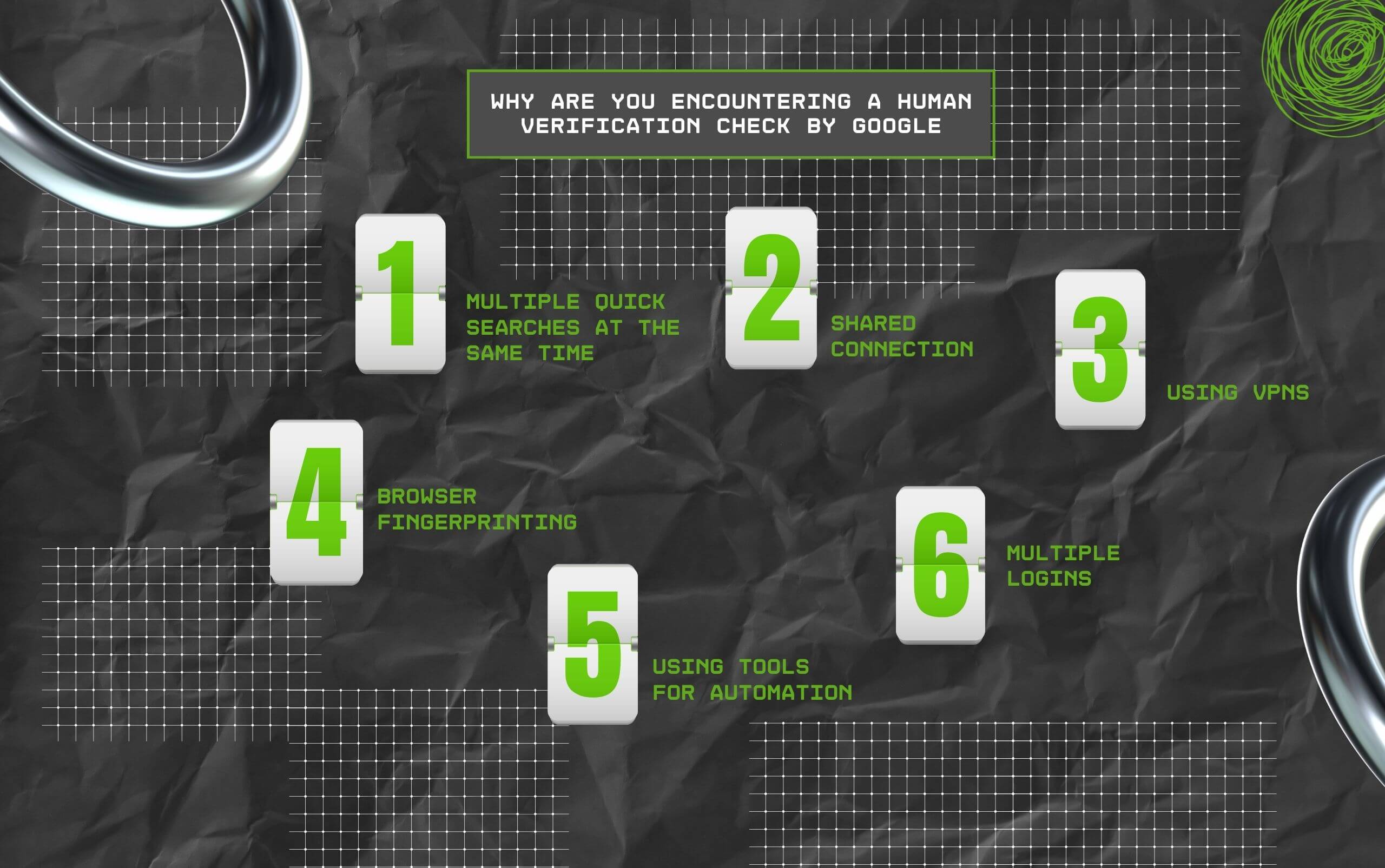
Most individual users who haven’t used automated tools ever might still receive the annoying ‘I’m not a robot’ message from Google.
And this can occur as a result of several reasons.
So, this one’s pretty easy to understand!
If you have been searching for several things quickly in Google search, there is a high possibility that the system will end up flagging it as an unusual or suspicious activity.
If you are searching for a lot of things in Google too quickly, there’s a high chance the system will flag it as suspicious or unusual activity.
In commercial settings and offices, like an internet cafe for general use, a majority of users are most likely to access the same internet.
So, the same internet connectivity would also highlight a similar IP address.
As a result, if a lot of people are on Google Search simultaneously, then it will add up – the number of requests and that too from the same source will be huge.
VPNs, or virtual private networks, can help make your Google activity and search appear as if it came from different devices or locations.
This is particularly true for incorrectly configured VPNs or if they aren’t from a credible company.
An IP address isn’t the only parameter that Google depends on for detecting any spammy or suspicious activity.
It also checks browser fingerprinting – this method analyzes several unique details related to your browser and device, such as plugins, operating system, and some other related settings.
Moreover, if all these details appear to be modified artificially or inconsistent, then you might get the annoying “I’m not a robot” test.
It is a possibility that you are using web scraping or automation tools.
While such tools are excellent at mimicking a real human, Google is no less – the search engine can detect automated activity easily.
So, it is possible to trigger Google’s human verification check in the process.
Multiple attempts to log in quickly can trigger not only ‘I’m not a robot’ text, but also ‘Google has detected unusual traffic’ text.
CAPTCHA, in such situations, is essential for ensuring that an actual human can log into their account, instead of some automated chatbot trying out various password and username combinations.
These are perhaps the most popular reasons behind your query: ‘why Google keeps asking if I’m a robot?’
While such checks might appear to be plain frustrating for many people, it isn’t surprising that multiple platforms have implemented the same.
This is even more true if you consider how 1/3rd of global internet traffic is made up of bots.
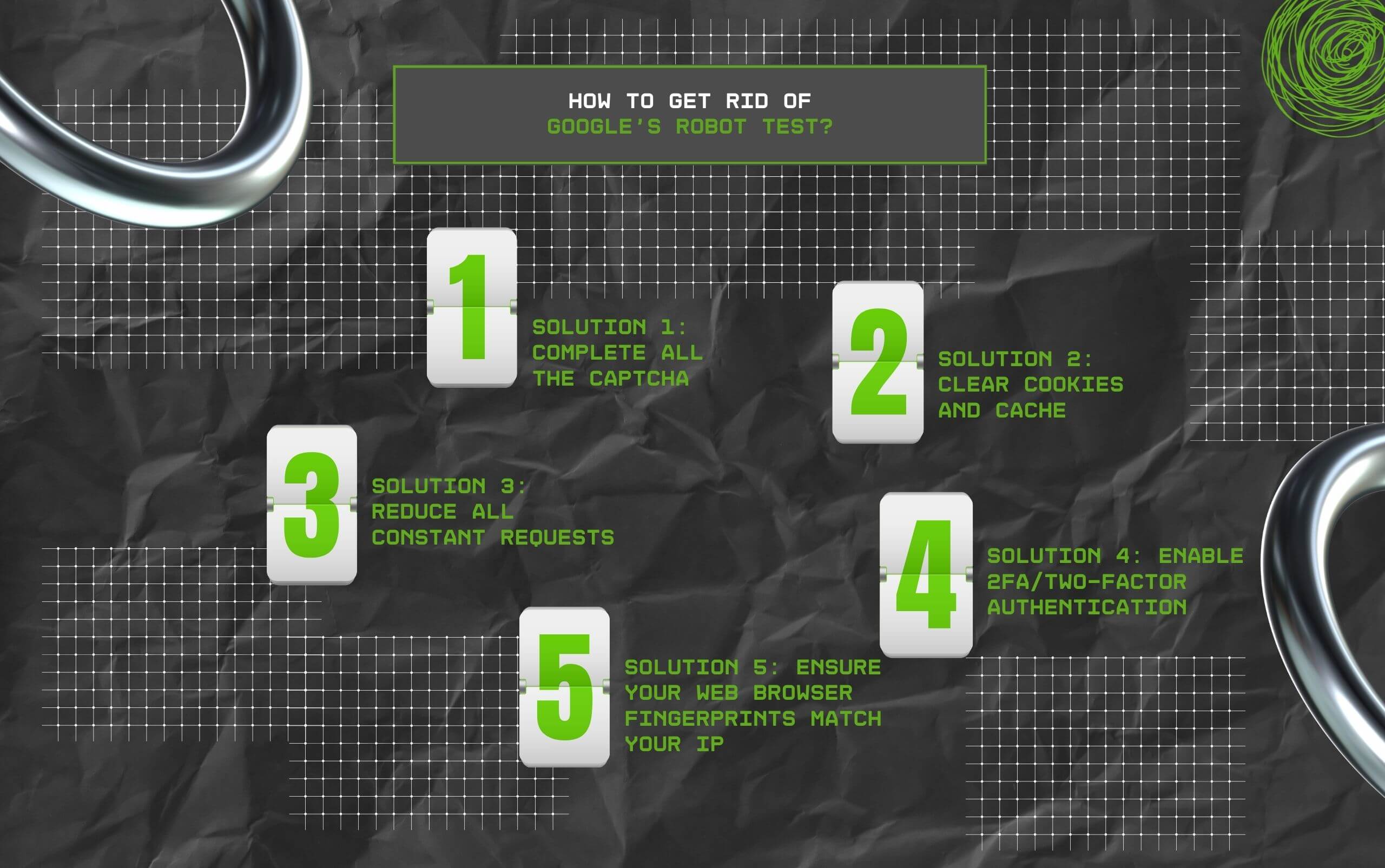
Now you know why Google keeps asking if I’m a robot – but how can you get rid of this annoying test?
Bypassing this test is usually easy and quick for most of us since it only asks you to complete a very simple CAPTCHA test or something basic like confirming you are not a robot.
Nonetheless, there are several situations where you might need to adopt relatively more advanced solutions.
As a result, I’ve done my best to break down each of these solutions for you in detail.
So, the fastest way of bypassing the human verification check is to finish the CAPTCHA test by Google.
It generally has a structure that follows a puzzle and a checkbox – just finish it and get rid of this test.
Moreover, completing this test successfully will tell the search engine giant that a real human being is accessing the internet.
Also, you can go back to the window you were at in the first place.
If your browser had stored information, but in the form of cache and cookies, then it might trigger Google’s robot test.
Moreover, it tells Google that some suspicious activity is going on. As a result, there’s a high probability that the search engine giant will constantly ask whether or not you are a robot.
Also, you should make it a point to clear the web browser’s cookies and cache to remove any suspicious or spammy data.
Reducing request frequency is another valuable way of avoiding the human verification check. The best part? It will work whether or not you are using any type of automation or chatbot.
Also, there are two ways to do this – either you can reduce request frequency, or you can visit the same website later.
So if you have an account that keeps getting the ‘Are you a robot?’ question, then you can enable 2FA or two-factor authentication to enhance the security of your account.
Personally, this is my favorite solution, and I have enabled 2FA for every login on all my devices – mostly because I use multiple devices to access my Google accounts.
Also, it keeps things safe and secure. In addition, it builds credibility for you with Google, helping you get rid of frustrating human verification checks.
Every time someone uses Google, the search engine giant checks their browser fingerprints and IP address for things like cookies and time zone.
So, when they are using a proxy set or VPN set to some other location, it does not match their time zone, and Google is likely to do the robot verification check.
It is also possible that you are using Google in incognito mode, which does not use your browser’s normally collected cookies, which are used by websites like Google to determine whether you are a human or a bot.
Read Also:
Barsha is a seasoned digital marketing writer with a focus on SEO, content marketing, and conversion-driven copy. With 8+ years of experience in crafting high-performing content for startups, agencies, and established brands, Barsha brings strategic insight and storytelling together to drive online growth. When not writing, Barsha spends time obsessing over conspiracy theories, the latest Google algorithm changes, and content trends.
View all Posts

Agency Guide To YouTube Growth: Wholesale Pri...
Sep 15, 2026
Top 5 Reputed SMM Panels To Buy Social Media ...
Sep 15, 2026
How Is Social Media Marketing Changing The Wa...
Sep 15, 2026
Structured Data SEO: How Schema Markup Helps ...
Sep 12, 2026
TikTok Downloader For Content Marketing Resea...
Sep 12, 2026