The Ultimate Guide To Competitor Backlink Analysis: An Actionable SEO Blueprint To Steal Your Rivals’ Traffic
Oct 23, 2026


How to fix slow MySQL queries? TBH, a year ago, I had no idea.
Interestingly, I was reading this blog on Percona that talked about how their most common query is ‘database is running slower.’
In my experience, I know it could be caused by several factors, but the most common factor is almost always a slow or bad MySQL query.
At the time, I thought some quick tuning of the configuration settings was enough to deal with this problem. But after reading Percona’s blog, I realized what I was doing wrong.
I wasn’t really identifying and fixing the issue for real. Instead, I was just putting a band-aid on the issue instead of fixing it properly.
So, it’s only fair I share how I learned to solve this problem, for real, especially for all content people who are a little slow themselves when it comes to boring tech stuff like MySQL queries.
Stay tuned.
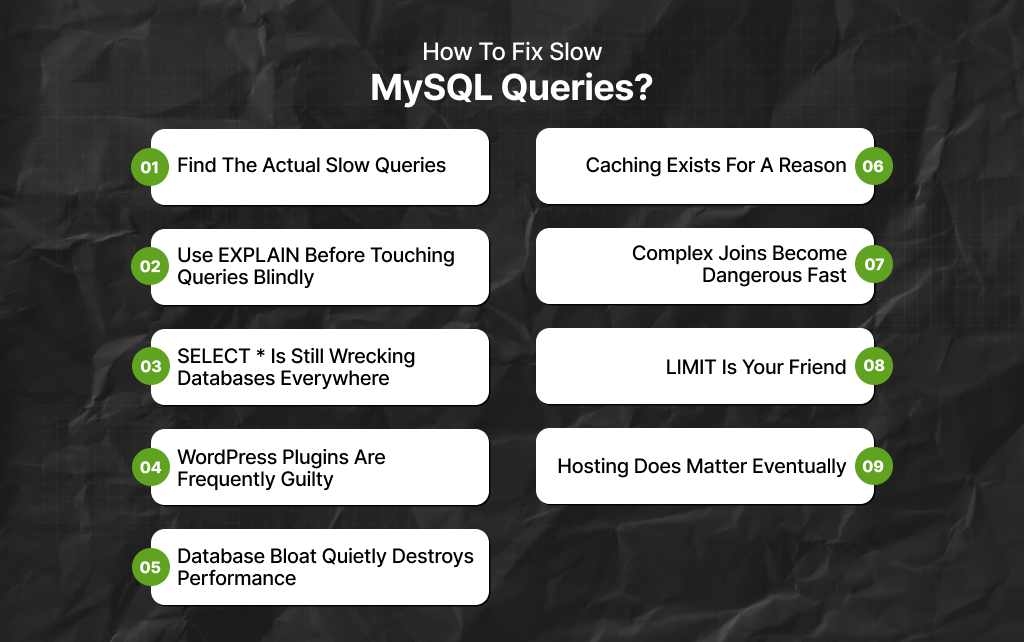
Most people blame the server first – that is usually how the panic starts, and of course, I wasn’t any different.
A website becomes slow, admin panels take forever to load, pages randomly hang for five seconds, and CPU usage spikes.
Suddenly, somebody is pricing VPS upgrades before even checking the actual queries.
Meanwhile, the real problem is often one terrible database query quietly setting the server on fire every few seconds.
That happens constantly, especially on:
And honestly, slow MySQL queries are one of those problems that look intimidating initially but usually come down to a handful of repeat mistakes.
Before fixing anything, you need visibility – understand that guessing is useless here. MySQL already provides tools for identifying problematic queries through the slow query log.
That log records queries taking longer than a defined threshold, usually 1 second, 2 seconds, or sometimes even slower, depending on the workload.
Once enabled, you can finally see:
And honestly, many developers discover one plugin or a badly written feature causing most of the damage immediately.
People obsess over single “heavy” queries, but repeated medium-sized queries can quietly destroy performance too, especially on dynamic content sites.
For example:
Also, one inefficient query running 20,000 times daily becomes a server problem very quickly, especially on shared hosting or smaller VPS setups.
This is probably the most common issue behind slow MySQL performance. Indexes help MySQL locate data efficiently instead of scanning entire tables repeatedly.
Without indexes, the database often has to search through enormous amounts of rows manually every time somebody loads a page.
This becomes brutal on larger tables, especially:
Also, a missing index on a frequently queried column can turn milliseconds into several seconds very easily.
This part gets ignored constantly.
So, people discover that indexes improve performance and suddenly start indexing everything emotionally.
Now inserts slow down, updates slow down, and storage grows unnecessarily.
TBH, indexes help reads, but they also create overhead during writes. So the goal is not to add indexes everywhere, but to add indexes where queries actually need them.
That distinction matters.
This tool saves enormous amounts of confusion. So, running EXPLAIN before a query shows:
And honestly, EXPLAIN often immediately reveals terrible decisions hidden inside queries. This includes things like:
Also, a lot of database optimization becomes much easier once you stop guessing how MySQL behaves internally.
This problem somehow refuses to die.
People constantly query: SELECT * FROM table_name
And this is even when they only need one column, two values, or small pieces of data. Now MySQL retrieves everything unnecessarily:
Moreover, on small tables, you may barely notice. But on larger systems, this becomes expensive fast, especially content-heavy websites with huge metadata tables.
Nobody likes hearing this part. But many slow WordPress websites are not suffering from bad hosting.
Instead, they are suffering from plugins making terrible database decisions constantly, especially plugins handling:
Also, some plugins generate absurd query loads with every page request.
And because site owners install plugins gradually over the years, nobody notices the cumulative damage until the site becomes painfully slow.
This happens constantly on older websites.
So, over time, databases accumulate expired transients, spam records, orphaned metadata, plugin leftovers, revision history, abandoned tables, unnecessary logs, and more.
Now queries operate against bloated datasets much larger than necessary, especially on content websites running for years.
Also, cleaning old junk often improves performance more than people expect – not magically, but noticeably.
One of the worst things a busy website can do is repeatedly ask MySQL the exact same question thousands of times daily.
That is wasted work. However, caching reduces unnecessary database activity by storing frequently requested results temporarily.
Moreover, different caching layers help differently with:
Without caching, MySQL ends up doing repetitive labor constantly for no reason, which eventually becomes a scalability nightmare.
Joins are powerful.
FYI, bad joins are terrifying, especially when large tables combine without proper indexing or filtering.
Now MySQL starts:
And suddenly, one dashboard request takes eight seconds. Of course, complex joins are not automatically bad.
But they require careful structure once databases grow significantly, especially inside reporting systems and analytics-heavy applications.
Another common mistake: loading enormous result sets nobody actually needs.
So, some systems still fetch thousands of rows, entire datasets, and huge admin exports during ordinary page requests.
Naturally, that destroys performance quickly.
As a result, if users only see 20 results, 50 rows, one page of data, then query only what is necessary initially.
Also, pagination exists because databases hate unnecessary workload, too.
Sometimes the server genuinely is the problem, especially if:
But people upgrade infrastructure prematurely, constantly, without fixing inefficient queries first.
That creates expensive servers running bad code faster, not actual optimization.
Read Also:
Barsha is a seasoned digital marketing writer with a focus on SEO, content marketing, and conversion-driven copy. With 8+ years of experience in crafting high-performing content for startups, agencies, and established brands, Barsha brings strategic insight and storytelling together to drive online growth. When not writing, Barsha spends time obsessing over conspiracy theories, the latest Google algorithm changes, and content trends.
View all Posts

The Ultimate Guide To Competitor Backlink Ana...
Oct 23, 2026
How To Land High-Authority Editorial Backlink...
Oct 23, 2026
Why Your Website Traffic Dropped Suddenly And...
Oct 23, 2026
How Do The Physical Google Review Tools Redef...
Oct 23, 2026
How To Get Your Brand Cited In AI Search Resu...
Oct 22, 2026