
Turn A Search Question Into A Watchable Explanation
Sep 16, 2026

A useful article does not automatically become a useful video when somebody reads it aloud.
Headings that help a reader scan can turn into interruptions.
Definitions that make sense beside a photograph can feel weightless over stock footage.
The subject may be relevant, but the viewer still has nothing specific to watch.
The script needs to choose a visible example that answers the searcher’s actual question.
If someone wants to know why a box lid will not close, show the obstruction and the decision it creates.
Do not begin with a history of boxes. Start by deciding what the viewer will be able to recognise in the footage with an AI video script writer.
“Box repair” names a topic.
“Is the hinge loose or is the wood catching?” names a decision.
The second gives a script somewhere to go: demonstrate the two symptoms, show what differs, and explain the appropriate next step.
That does not mean every video must be a tutorial. A comparison or explanation can be equally focused if the viewer’s uncertainty is clear.
Before drafting, write a one-sentence description of what the viewer should understand afterward.
Avoid an outcome as broad as becoming familiar with the subject.
For the box example, the viewer should be able to distinguish movement at the hinge from contact along the lid.
The script can now reject material that does not help establish that distinction.
Use the source article to identify supporting information, not to dictate the sequence automatically.
The article may define several hinge types because readers arrive with different questions.
This video might need only one type to demonstrate the chosen problem.
Removing unrelated material is not necessarily oversimplification. Removing the condition that makes the explanation correct would be.
A visible example must do explanatory work.
A slow pan over an attractive wooden box establishes the object but may reveal nothing about the fault.
Opening the lid while the hinge moves against the frame gives the viewer something to inspect.
The narration can then name the movement they have just seen instead of carrying the whole explanation alone.
Plan the order carefully.
Show the complete object first so the close-up has a location.
Then isolate the relevant area.
Return to the wider action once the distinction is understood.
If the first image is an extreme close-up of unfamiliar hardware, viewers may spend the explanation trying to work out what they are looking at.
Some questions cannot be settled by a single image.
A comparison may require the same action under two conditions.
Keep the setup comparable enough that the changed detail is meaningful.
For example, show the lid moving from the same angle before and after the hinge is secured.
Do not imply that a different box, camera position, or hidden adjustment proves the point.
Where a real demonstration is unavailable, use an explicitly presented simplified model or explain the limit of the footage.
A decorative animation is not evidence of how a particular product behaves.
The script should distinguish an illustration of a principle from a recorded result, especially when viewers may act on what they believe they have seen.
There is also a reason to keep some material in the article.
A comparison of six hinge sizes may be easier to consult in a labelled table than to remember from narration.
The video can demonstrate how to identify the relevant hinge while the accompanying text holds the measurements.
Giving each format a distinct job avoids making a viewer pause repeatedly to recover information that was already easier to read.
Before committing to the video, try framing the smallest movement the explanation depends on.
If your available camera cannot show it clearly, change the example or plan a genuinely informative diagram.
Discovering that limitation while outlining is far less disruptive than discovering it after a full voiceover has been recorded.
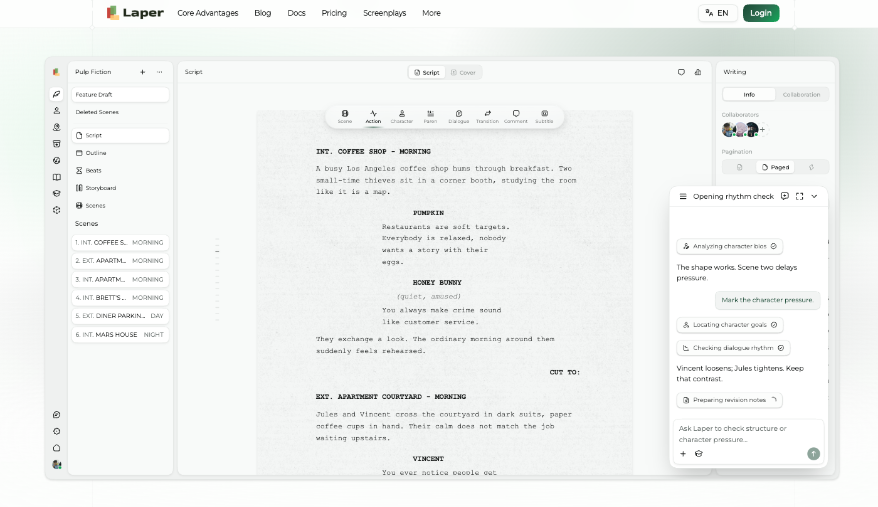
With the question and the filmable example settled, give Laper’s AI Script Writer that narrow brief to develop.
Include the distinction the explanation must preserve.
Review the proposed sequence for those elements before assessing whether the narration sounds polished.
The viewer begins unable to identify the problem.
After the first demonstration, they can see where movement occurs.
After the comparison, they understand why that movement matters.
The next passage can then address the practical decision.
These changes in understanding are a better organising device than transferring the article’s headings into a voiceover.
Laper separates authored beats from scenes derived from screenplay headings.
For a short explanation, use that distinction deliberately.
The beat describes what the viewer learns, while the scene describes what can be shown.
A note that says “understand the difference” is not yet a filmable scene.
It needs the lid movement, camera view, and narration that make the distinction available.
Working with an AI Script Writer online can make alternate orders easier to draft, but compare them against the same question.
One version might explain both faults before demonstrating either.
Another might show the first fault immediately and introduce the second as a contrast.
Choose the order that asks less unnecessary remembering from the viewer.
Do not invent suspense where the audience wants an answer.
A search-led explanation can state the likely distinction early, then demonstrate it.
Withholding the practical point until the final seconds may suit another kind of entertainment, but it can frustrate someone trying to decide what to inspect.
The script should respect the reason the person came.
Once the rough sequence exists, listen for duplication.
If the shot clearly shows a hand lifting the lid, the voice may not need to announce that action.
It may need to explain where to look, what the movement means, or which condition would change the conclusion.
Give the voice a job the image cannot perform on its own.
Duplication can still be useful at a critical moment.
A short spoken cue can direct attention to a small movement that would otherwise be missed.
The decision is not whether words and images ever overlap.
It is whether the overlap helps. Remove narration that merely fills silence, and preserve the cue that makes the example legible.
Review the Laper draft against the rough visuals rather than continuing to improve the prose in isolation.
A sentence may be excellent on the page and unnecessary in the film.
Conversely, a plain instruction to watch the upper screw may do exactly what the scene needs. Judge the combined explanation.
Finish with the decision established by the example and any essential boundary.
A single video cannot diagnose every damaged box, and it should not pretend to.
Nor does a clear script guarantee search visibility or traffic.
What the editor can verify before publication is more immediate.
The question is answered, the example supports the answer, and the viewer can tell what the demonstration did and did not establish.
Read Also:
Barsha is a seasoned digital marketing writer with a focus on SEO, content marketing, and conversion-driven copy. With 8+ years of experience in crafting high-performing content for startups, agencies, and established brands, Barsha brings strategic insight and storytelling together to drive online growth. When not writing, Barsha spends time obsessing over conspiracy theories, the latest Google algorithm changes, and content trends.
View all Posts

Agency Guide To YouTube Growth: Wholesale Pri...
Sep 15, 2026
Top 5 Reputed SMM Panels To Buy Social Media ...
Sep 15, 2026
How Is Social Media Marketing Changing The Wa...
Sep 15, 2026
Structured Data SEO: How Schema Markup Helps ...
Sep 12, 2026
TikTok Downloader For Content Marketing Resea...
Sep 12, 2026