Why Your Website Traffic Dropped Suddenly And How To Fix It
Oct 23, 2026

Website traffic dropped suddenly is a phrase that terrifies any marketer, but unfortunately, it is a rather common scenario in the modern digital environment.
If you opened your analytics today and saw a steep cliff on the organic traffic graph, do not despair – I was in the same situation dozens of times before, and any technical issue that causes a traffic drop can be resolved if you know what to do.
When your data plunges, it is easy to assume the worst. In my tracking work alongside specialized diagnostic agencies like Website Rescue Co, I have found that a data cliff is a tangible event that can be systematically traced, diagnosed, and repaired if you look in the right places.
| Common Trigger | Technical Root Cause | Expected Traffic Signature |
|---|---|---|
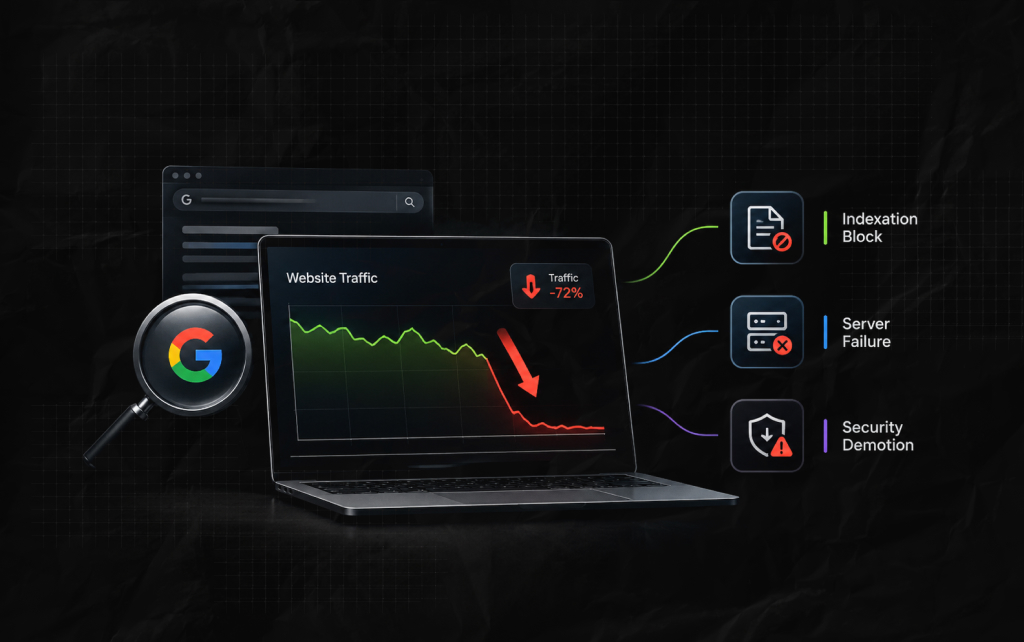
| Indexation Block | Accidental noindex tags or robots.txt rules | Near-total collapse across all pages within 48 hours |
| Server Failure | Continuous HTTP 500 or 503 response codes | Sharp drop accompanied by a spike in crawl errors in GSC |
| Security Demotion | Malware infection or automated hacking injections | Immediate drop alongside a “This site may be hacked” warning |
To determine the critical point in the decline in the visibility of the resource, it is vital to analyze the external and internal factors influencing it.
In most cases, there are objective reasons for the drop in traffic, which can be observed in the code of the site or in the search results.
The main categories of traffic falls that I noticed upon studying numerous cases include indexation problems, server failures, and security issues.
To quickly find the cause of the traffic drop, you need to look at the changes in the statistics and correlate them with the current characteristics of the site.
When studying the reason for the fall, I always divide the potential reasons into three main categories:
This classification helps me identify the particular cause of the traffic drop and find a way to eliminate it.
Structural reasons include the accidental blocking of robots.txt, which results in a complete withdrawal of the resource from search results.
The website can also be blocked by Google if unauthorized changes to the server, such as malware, occur on the project.
In addition, one of the critical reasons for the drop in traffic is the loss of quality backlinks, which leads to a decrease in the authority of the domain. Now let’s take a closer look at the main traffic analysis tools.
| Data Verification Metric | Expected State If Tracking Error | Expected State If Genuine Drop |
|---|---|---|
| GA4 Realtime Users | Zero or near-zero globally | Normal active user spikes |
| GSC Organic Clicks | Flat or normal historical curve | Sharp downward trend |
| Server Logs (HTTP 200) | Constant, healthy response volume | Drastic drop in request volume |
Once you notice your website traffic dropped suddenly, don’t panic and start changing things at random.
Before you touch a single line of code, rewrite your content, or mess with your links, you need to step back and run through a systematic diagnostic checklist.
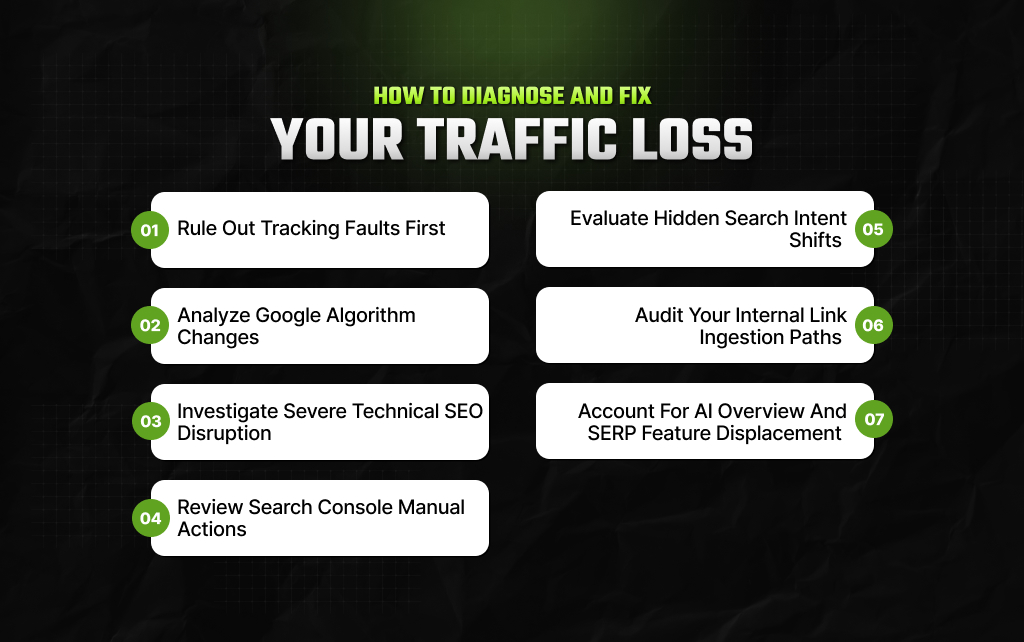
Before you blame your content or your server for a sudden drop in traffic, make sure your tracking tools aren’t just lying to you.
Whenever numbers plummet, the very first step should be checking whether you actually lost visitors or if your data stream is just broken.
If both GA4 and GSC show a drop, you are likely looking at a Google algorithm update. Google tweaks its search systems constantly, and a major core update can completely reshuffle search results overnight.
Here is how to figure out if an update hit you:
Actionable Inspection Checklist:
A sudden, cliff-like drop overnight almost always means a major technical block is stopping search engine crawlers in their tracks.
When traffic plummets this fast, you need to look immediately at recent code changes that might have kicked your site out of Google’s index entirely.
Here is what to check right away:
While algorithm updates are automatic, Google also uses human reviewers to penalize sites that break its webmaster guidelines. If a human reviewer intervenes, it can cause your organic traffic to fall off a cliff.
Here is how to check for a manual penalty:
Here’s a look at the type of penalty and what you need to do to recover from it:
| Penalty Type | Visibility Impact | Primary Diagnostic Step |
|---|---|---|
| Algorithmic Adjustment | Sudden or gradual scaling across page groups | Match dates against official updates |
| Manual Action Penalty | Complete or near-total removal overnight | Check the Manual Actions tab in GSC |
Even if your rankings, code, and tracking are flawless, your traffic can still slip away. When this happens, it is usually because the “search intent” behind your keywords has shifted, and Google is now looking for a completely different type of content than it used to.
Here is how to spot and fix a shift in search intent:
Internal Linking Health Checklist:
One of the most neglected factors that affect the visibility of the resource is the internal linking strategy.
When examining the reason for the traffic drop, it is essential to take a close look at the current distribution of the links and their distance from the homepage to the desired page.
In addition, it is worth looking at the global menu of the website and eliminating long redirect chains, which slow down the movement of users and annoy crawlers.
Finally, it is necessary to ensure that the anchor texts of internal links contain the keywords that describe the destination of the link.
Tactical AI Optimization Rules:
Finally, the modern organic landscape is no longer ten blue links. A primary reason why your website traffic dropped suddenly is due to the quick adoption of advanced search features directly into consumer queries.
Essentially, Google now displays much more information directly in response to a search query. For example, it shows everything from direct answers to alternative product suggestions.
Consequently, these innovations can cause your traffic to drop. You can detect this drop by analyzing your impressions and the volume of answers shown directly on the SERP.
In addition, your traffic might decrease because of new Google modules. Specifically, features like “People Also Ask” or the “Local Pack” draw user attention away from standard links.
To reduce this negative impact, you need to adapt your strategy. Specifically, you should optimize your content for direct responses. Furthermore, you should present your information in a more organized and tabulated manner.
Recovery time after loss of visibility largely depends on the reason for the decline.
If the traffic drop was caused by technical factors, such as indexing or tracking problems, its consequences can be eliminated in 24-48 hours, which is related to the speed of Google’s crawlers.
At the same time, if a traffic fall was related to algorithmic changes, it will take much longer to recover.
In my practice, I noticed that resources that performed poorly after the release of new Google algorithms took about six months to regain their previous visibility. [Source: Search Engine Roundtable]
Finally, to recover from a manual penalty, a website owner must first remove all violations found on the site. After doing this, they can apply to Google for reconsideration.
Google processes these requests over a period of several weeks. Sending multiple requests will not speed up the process. On the contrary, it will only extend your waiting time.
Ankita Tripathy loves to write about food and the Hallyu Wave in particular. During her free time, she enjoys looking at the sky or reading books while sipping a cup of hot coffee. Her favourite niches are food, music, lifestyle, travel, and Korean Pop music and drama.
View all Posts

How Do The Physical Google Review Tools Redef...
Oct 23, 2026
How To Get Your Brand Cited In AI Search Resu...
Oct 22, 2026
The Ultimate Blueprint For Broken Link Buildi...
Oct 16, 2026
The Ultimate Guide To Stealing Your Competito...
Oct 15, 2026
Beyond The Basics: Master Guest Posting For H...
Oct 15, 2026