Image Link Building: A Simple Guide To Earning Easy Backlinks
Oct 27, 2026

If you have spent any significant amount of time scrolling through the gram, you have likely run into a sudden wall.
You try to refresh your feed, upload a reel, or open a direct message, and instead of your content, you are hit with a blank screen, a spinning wheel of death, or a cryptic message: “5xx Server Error On Instagram.”
It is incredibly frustrating, especially if you run a business or manage creator accounts where uptime means money.
When you look up this error online, most commodity blogs give you the same copy-pasted, useless advice: “Restart your phone!” or “Check your internet connection!”
As someone who has been working in this digital marketing industry for 8 years, let me tell you the blunt truth: if you are genuinely seeing a 5xx error, your phone and your internet are usually completely fine.
To truly get a handle on what a 5xx Server Error on Instagram means, we need to take a quick dive into the platform’s operational mechanics.
Imagine you have just tapped the Instagram app icon on your mobile phone. The content you see – like photos, videos, and accounts – is not actually stored on your device. That is because your phone is just a client.
Therefore, to fulfill your request, your phone must reach out through the internet. It pings a massive network of servers, databases, and Content Delivery Networks (CDNs) that make up Meta’s backend infrastructure.
During normal times, these backend servers process your request flawlessly. They wrap up the data and send it right back to your mobile phone. Along with that data, they attach a secret success code. Typically, this is an HTTP status code 200 OK.
Ultimately, you never see these success codes on your screen because everything is working exactly as it should.
HTTP status codes are grouped into five distinct buckets:
When your screen flashes a 5xx Server Error on Instagram, the bucket explicitly changes to the 500 range.
This means your phone did everything perfectly, your internet successfully delivered the request to Meta’s doorstep, but Instagram’s server backend encountered an internal error, crashed, or was completely incapable of processing the request.
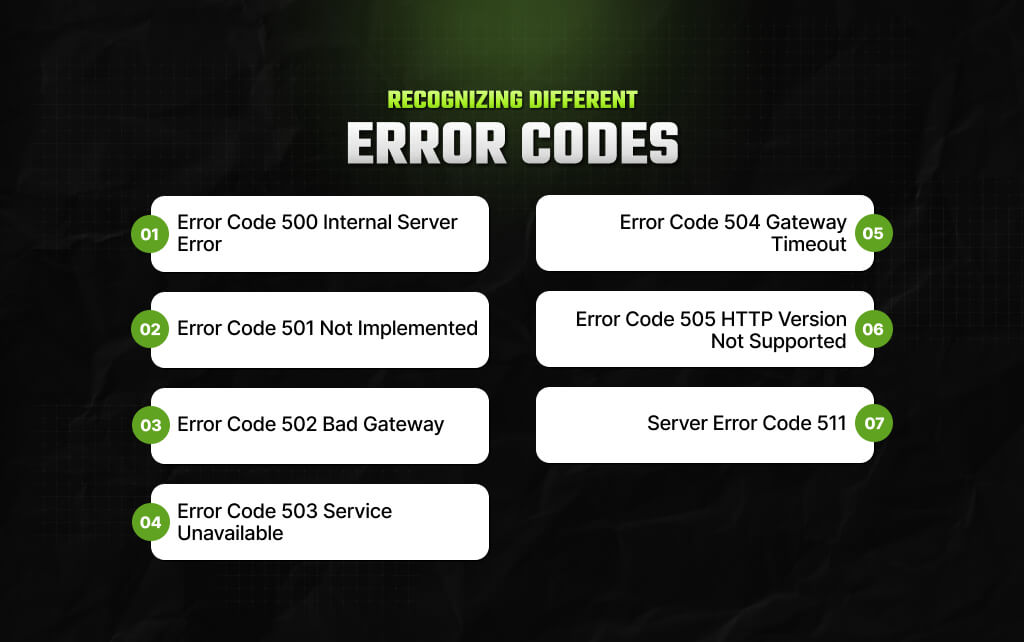
Now that you have a fair idea regarding what is a 5xx server error let’s understand that there are several types of 5xx error codes. Scroll down and check out some such error codes mentioned below!
So, do you have some idea as to what is 5xx server error on Instagram? But did you know that there are several types of such errors? One such type is an internal error in the server with a code of 500. This usually happens when the site encounters any unexpected request and fails to complete the user’s requests.
The ‘not implemented’ problem with a code of 501 usually happens when the website server lacks the basic functionality for handling a request. It is a classic example of the server’s failure to identify the request method. This happens because of Instagram’s failure to meet the requirements of the server.
The bad gateway error with a code of 502 usually happens when the website server receives an answer that’s incorrect from the actual upstream server it initially accessed. This is a type of 5xx error that happens because the website server while attempting to handle the user’s request, it ends up acting as a proxy or gateway instead.
This is definitely the main code to watch out for. A 503 error indicates that the servers are functionally up and running from Instagram’s perspective. However, they are utterly unable to fulfill your request at that precise moment.
Typically, this disaster will occur under two specific circumstances:
Under the ‘gateway timeout’ issue with a code of 504, the website server fails to obtain a response timely from an upstream server given by a ‘request URL.’ While acting as a proxy or a gateway, the website server basically fails to access or even finish the request.
The ‘HTTP Version Not Supported’ problem with a code of 505 is one problem where the website server either doesn’t support the HTTP protocol version or refuses to do so. In such cases, your screen might just display a request message which says, ‘(505) HTTP Version Not Supported.’
When a user gets a server error with a code of 511, it means that the user will have to authenticate their identity. This error code provides access to the network of Instagram – the 511 server error is just a type of signal. It basically means the server of Instagram needs network authentication.
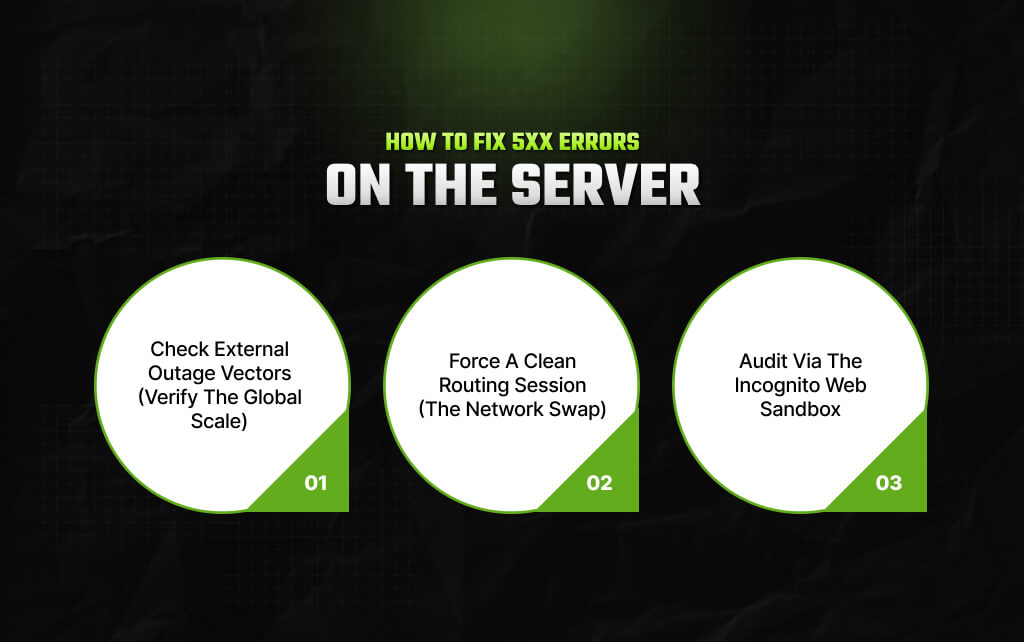
Let’s be completely honest here. Since a 5xx Server Error On Instagram is a server-side problem, you cannot magically repair Meta’s server architecture through your device settings.
However, your app will sometimes cache bad data. It can also run into local glitches that look exactly like a server failure.
Therefore, instead of throwing darts in the dark, you should use my systematic diagnostic triage checklist. This will help you pinpoint the real problem instantly.
First, ask yourself if you are truly alone in this. I always do this before clearing a single application setting. If the rest of the world is suffering too, your local troubleshooting will be a total waste of time.
To check this, head straight over to Downdetector and search for Instagram.
If you see a very tall spike on the graph with thousands of reports in the last ten minutes, then Instagram is facing a massive infrastructure failure.
In addition to that, check their official channels. Log onto X and look at the @InstagramComms page, or simply search the hashtag #InstagramDown.
Meta’s communications team actively uses those channels when they are battling a backend server fire.
On the other hand, what if Downdetector shows completely normal, flat lines?
In that case, the 5xx error is likely a one-off routing issue between your local Internet Service Provider (ISP) and Instagram’s closest Content Delivery Network (CDN) node.
Disconnect from your Wi-Fi network immediately. Then, switch your phone entirely over to cellular mobile data.
When you change networks, you force your device to abandon its current IP address. Consequently, it must find a totally new routing path through a completely different network operator.
Occasionally, the native Instagram app gets stuck in a nasty feedback loop. It will continually reload a cached, broken form of a 500 error page even when the actual servers are back up and running.
Open Safari, Chrome, or Brave on your device. Next, enable Incognito or Private Browsing Mode and navigate directly to instagram.com. Try logging in from there.
Incognito mode accesses a truly empty, sandboxed environment. It operates with zero cookies, zero saved logins, and absolutely no local cache.
Ultimately, if the web browser works perfectly while your app still reports a 5xx error, you have caught the culprit. You have successfully confirmed that a corrupted app cache on your phone is causing the lockout.
| Action Item | Difficulty | True Impact |
|---|---|---|
| Check Downdetector Outage Map | Very Easy (1 min) | Critical First Step |
| Toggle Wi-Fi to Mobile Data | Very Easy (5 secs) | High (Bypasses local routing blocks) |
| Test via Incognito Mobile Browser | Easy (2 mins) | High (Isolates app vs. server issues) |
| Purge/Clear App Cache Data | Medium (3 mins) | Medium (Fixes app loops) |
The next time you are hit with a 5xx Server Error On Instagram, don’t panic. Use this framework: check if the global system is down first, isolate your app from your browser network, and let Meta’s infrastructure engineers handle the heavy lifting while you preserve your time.
Read Also:
Barsha is a seasoned digital marketing writer with a focus on SEO, content marketing, and conversion-driven copy. With 8+ years of experience in crafting high-performing content for startups, agencies, and established brands, Barsha brings strategic insight and storytelling together to drive online growth. When not writing, Barsha spends time obsessing over conspiracy theories, the latest Google algorithm changes, and content trends.
View all Posts

Image Link Building: A Simple Guide To Earnin...
Oct 27, 2026
Podcast Link Building: Get High-Authority Bac...
Oct 27, 2026
The Ultimate Guide To Competitor Backlink Ana...
Oct 23, 2026
How To Land High-Authority Editorial Backlink...
Oct 23, 2026
Why Your Website Traffic Dropped Suddenly And...
Oct 23, 2026